
SchoolAdminCE release notes
What changed in each version, newest first. The current version is 2026.0.1.
SchoolAdminCE 2026.0.1 AI+
Released 16 November 2026. Download it now.
Our biggest release yet. Your school office, now on WhatsApp and email. Fee receipts reach parents the moment they pay, campaigns go out on time from ready-made templates, and your data is one click away from a safe backup.
Version numbers now follow the year: 2026.0.1 is the version after 2032.8.
What is new
- WhatsApp fee receipts: the moment a fee payment is recorded, the parent gets a WhatsApp receipt with the amount, receipt number and date, and an email too if you choose. Each receipt reaches a parent once, even if the payment screen is saved again.
- Email and WhatsApp campaigns: pick a template, the classes and sections (or the whole school) and a date and time. SchoolAdmin shows how many parents it will reach; eKTextAI sends it on time. Follow its progress, or cancel it before it starts.
- See every message before it goes: all templates are shown filled with sample values, with their WhatsApp approval status. Ready-made templates for fee receipts, school notices, event reminders and invitations are included.
- AI answers for parents: SchoolAdmin keeps eKTextAI up to date with your notices, events, holidays and school records, so parents get correct answers on WhatsApp from your own information.
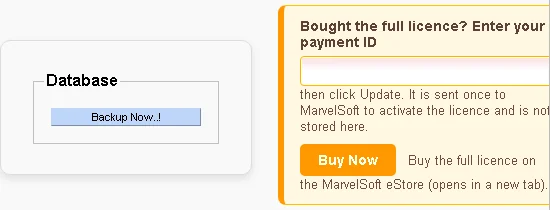
- Database backup in one click: School Profile → Database → Backup Now downloads a complete backup straight to your Downloads folder, named with your database and the date and time.
- A refreshed login page: an assistant that answers how to do anything in SchoolAdmin, Admin FAQs, links to eKTextAI and our YouTube tutorials, and our new WhatsApp helpline, +91 80957 51248.
Messages are sent by eKTextAI from your school’s own WhatsApp number and email address.
Barcodes and QR codes for library books
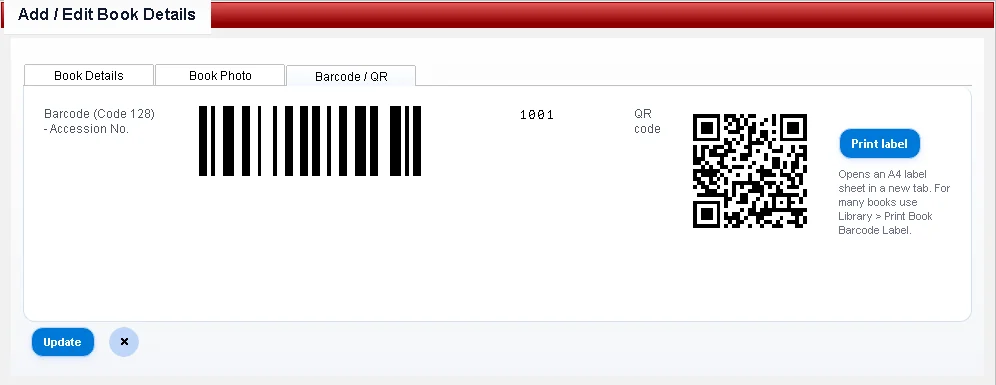
Every book gets a Code 128 barcode (its accession number) and a QR code (book ID, accession number and title). SchoolAdmin makes them itself: no barcode font, no extra software and no internet needed.
- On the book screen: open a book under Library Master → Books and choose the Barcode / QR tab to see both codes, with a Print label button.
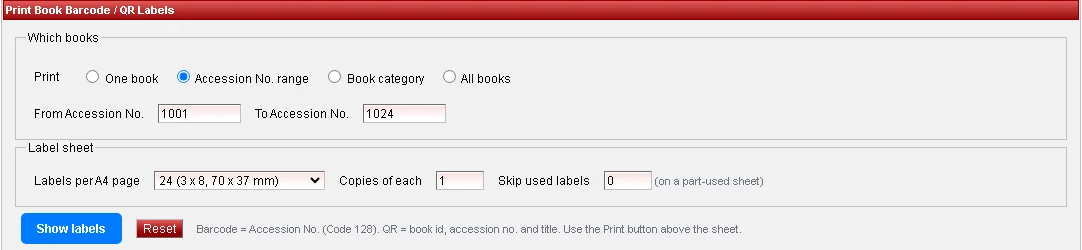
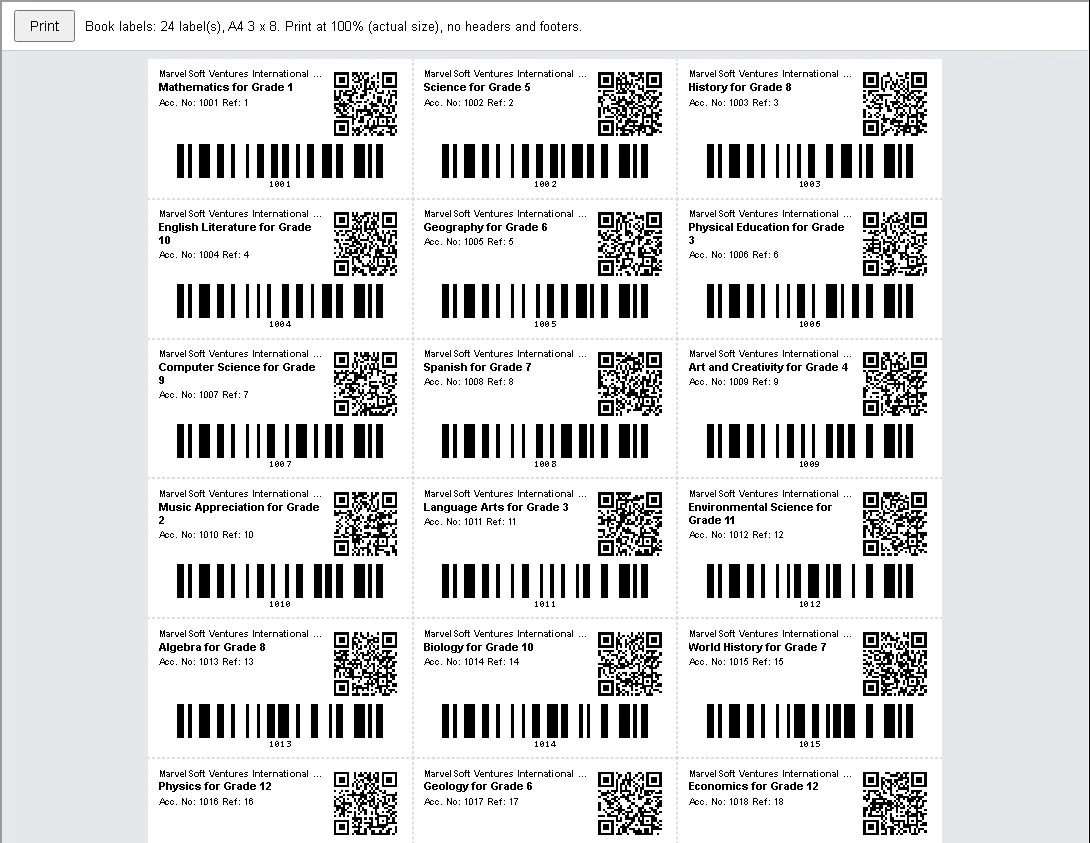
- A4 label sheets: Library Master → Print Book Barcode Label prints labels for one book, a range of accession numbers, a book category or all books, 24 (70 × 37 mm) or 40 (52.5 × 29.7 mm) to a page. Choose copies of each, and skip the labels already used on a part-used sheet.
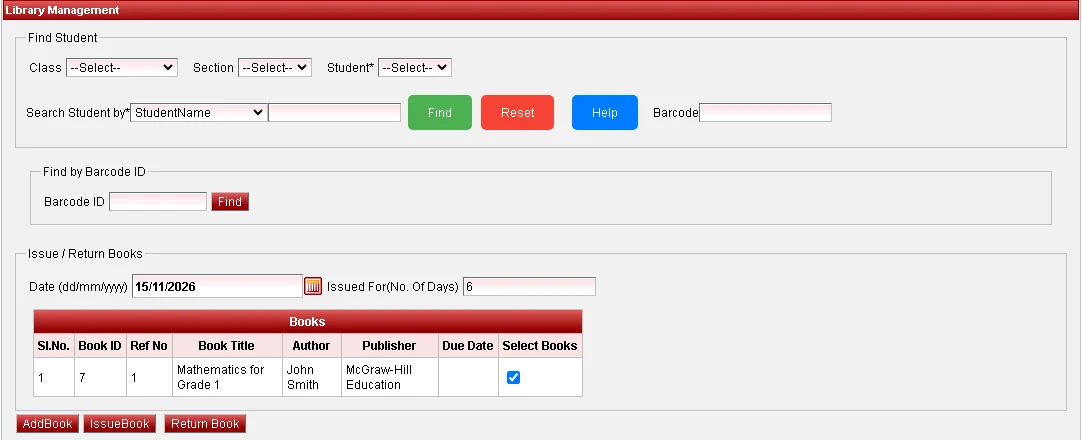
- Scan to issue and return: in Library Management, scan a book’s label with any USB barcode or QR scanner and the book is found and ticked, ready for Issue Book or Return Book.
Barcodes and QR codes for students
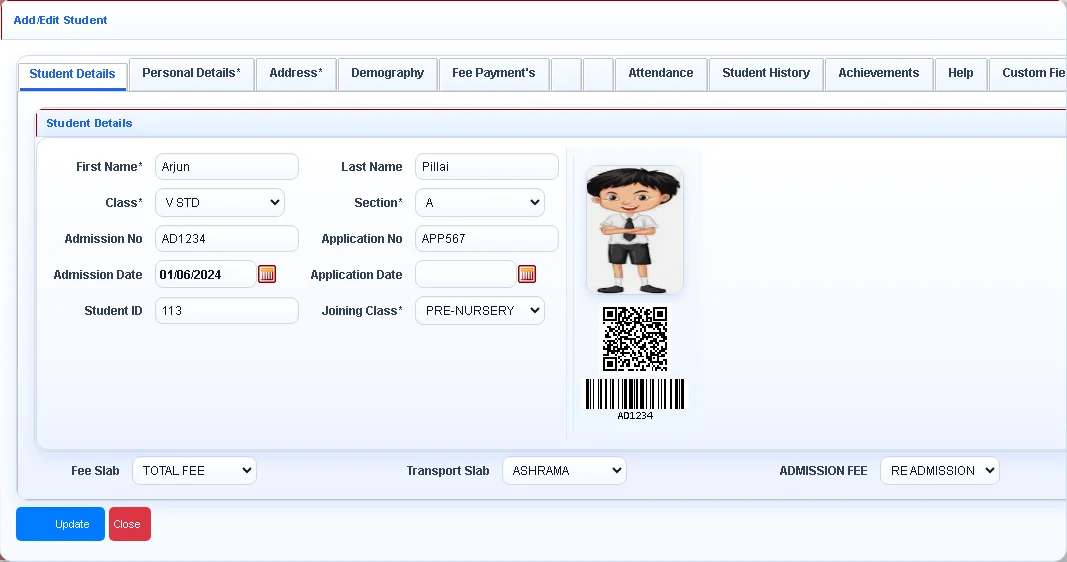
- On the student screen: each student’s QR code and barcode (admission number) appear under the photo.
- On ID cards: ID card templates can print the student’s barcode and QR code next to the photo.
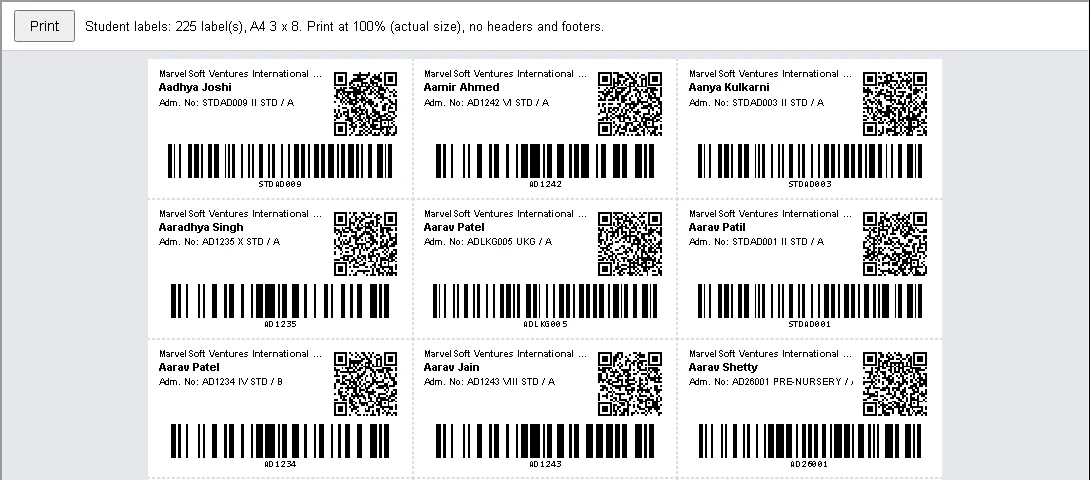
- Students Barcode label sheet: Other Reports → Students Barcode Report prints labels for a class and section, one student or the whole school, on the same 24 or 40 label A4 sheets.
- Scan to find a student: scan a student’s ID card into the Barcode box of the student search and the student is found straight away, including when issuing library books.
A proper email template editor
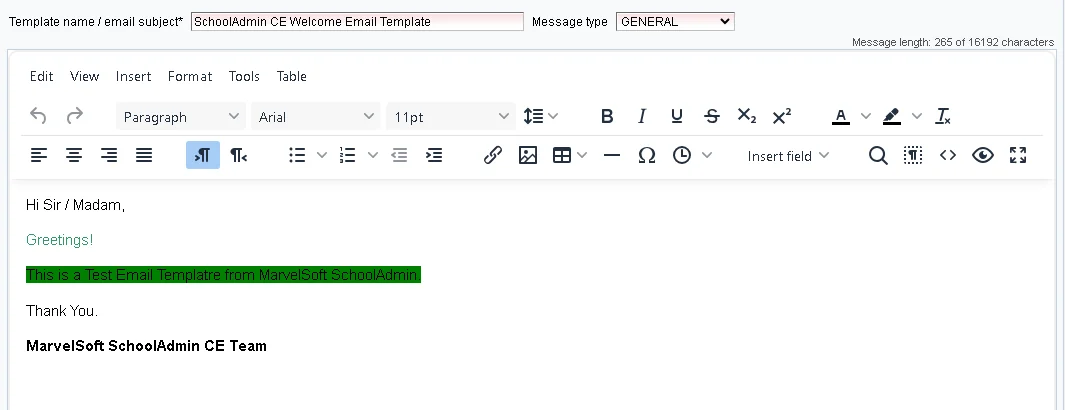
- Write emails the way you want them to look: fonts (Indian-language fonts included), sizes, colours, tables, links, pictures by web address and a source view. Paste from Word and the formatting stays.
- What you design is what parents get: fonts and colours are kept all the way to delivery, and ₹, Hindi and Kannada text arrive intact instead of as question marks.
- Insert field: add fields such as the student’s name or your school name from a menu; they are filled in when the email is sent.
- Safe by design: scripts and other unsafe content are removed when a template is saved, and the template list shows a short plain-text preview, so a template can never break the screen.
Buy the full licence from inside SchoolAdmin
The School page under Settings now has a Buy Now button that opens the MarvelSoft eStore. After paying, enter the payment ID from your receipt in the box above it and click Update to activate the licence.
Fees: UPI QR codes and whole-class receipts
- UPI QR code made by SchoolAdmin itself: the QR code on Fee Payment and on the fee receipt no longer needs a separate QR server, and it works without internet. Enter your school’s UPI ID once under Settings → Key Value Config → FEE_CONFIG.
- Print all receipts: Fee Payment Receipts has a new Print all receipts button: every receipt for a class, a section or one student in one PDF, one receipt per student and payment date.
- Settings you can find: Settings → Key Value Config now lists the UPI settings and the holiday settings (calendarific.com) that used to need a manual. Missing settings are added empty, ready to fill in.
Exams and report cards
- Visual report cards for a whole class: Visualize Student Report Card prints one student, a whole section or the whole class, in the preview and in the PDF.
- Graphs drawn for you: the graphs on the card are drawn when the card is printed, for every student at once. No more opening the graph pages one student at a time.
- Consolidated Marks List: a new Total column, room for up to 20 subjects so every subject is printed, and an Excel export that leaves out subjects the class does not have.
- Hall tickets for a whole class: print a whole section or class without running out of memory. A student whose ticket cannot be made is left out and listed on a last page, instead of stopping the rest.
- Previews that look like the printed report: every HTML report preview appears on a clean white page with a Print button, with the logo, photos and graphs shown.
A new dashboard
The home page now shows summaries and charts instead of tables: student, boys and girls counts; income, expense and balance; students by class; income and expense by month; and birthdays, holidays and signed-in users as short lists. New installations start with the Ruby theme.
Install SchoolAdmin as an app
- Its own window and icon: in Chrome or Edge, an Install SchoolAdmin app button on the login page adds SchoolAdmin to the Start menu and desktop. It opens in its own window, like any other program.
- Always up to date: SchoolAdmin pages always come from your school’s server; only pictures, styles and scripts are kept on the PC, so it opens faster.
- A clear message when the server is off: if the SchoolAdmin server cannot be reached, a short page says so instead of a browser error.
- From other PCs on the network: browsers only install apps from a secure address. The button explains the simple options: install on the server PC itself, allow the address in the browser, or set up https.
A refreshed login page
- Ask the assistant: ask how to do anything in SchoolAdmin, or open the Admin FAQs. Answers come from eKTextAI.
- eKTextAI and YouTube links in the top and bottom bars, our tutorials one click away.
- New WhatsApp helpline, +91 80957 51248, on the login page, in the Help menu and in the footers.
- New banners for this release, sent to existing installations automatically. The version is shown on the login page, in the Help menu and in the browser title.
A new installer: fully 64-bit
- 64-bit from top to bottom: Java, Tomcat and the database are all 64-bit, and SchoolAdmin installs into the 64-bit Program Files folder. An older version is removed first, wherever it was installed.
- Up to 4 GB of memory for SchoolAdmin: the application server can now use up to 4096 MB, so large schools with many students, reports and users stay fast.
- Encrypted connections, out of the box: all communication with eKTextAI and with the MarvelSoft licence server goes over TLS 1.2 with current ciphers. There is no certificate or Java setting to change on the school’s PC.
- Its own Java: a private 64-bit Java comes inside the SchoolAdmin folder. Nothing is added to Windows, there is no Java updater to break it, and other Java programs on the PC are left alone.
- Easy to recognise: the Windows services carry the version in their names, so it is clear which version is running.
- Ready for 2026-27: the sample school, the fresh school and the blank database all start in the 2026-2027 academic year.
- Updated licence agreement: covers personal data under India’s Digital Personal Data Protection Act 2023. The licence must be accepted before installing.
- Clearer setup pages: the folder page asks for the Backup Location for a new install and the Restore from Database Location when restoring. The setup screens have a new look, with the version and build date.
- Old AI helper removed: the separate SchoolAdmin-AI helper service is no longer installed, and upgrading removes it. The login page assistant now uses eKTextAI only.
System requirements: 64-bit Windows; 8 GB of memory or more is recommended. Take a backup before installing over an older version (School Profile → Database → Backup Now).
Under the hood
- Backups that work everywhere: Backup Now finds the database SchoolAdmin is really using, on whatever port and in whatever folder it is installed, including “Program Files”. If a backup cannot be made, it tells you why.
- A lighter database: news and banner pictures are kept as files instead of inside your database, so it stays smaller and backups are quicker. Older pictures move over by themselves.
- A faster login page: pictures are only refreshed when they change, not on every visit.
- Pictures survive upgrades: news and banner pictures are no longer lost when SchoolAdmin is upgraded.
- Payments are never held up: if the internet or eKTextAI is not reachable, the fee payment is saved as usual; only the receipt message waits.
- Parents’ choices respected: parents who opted out of WhatsApp messages are skipped automatically, in receipts and campaigns alike.
- Safer backups: your database password is never exposed while a backup runs, and temporary backup files are removed straight after the download.
- Secure connections on older PCs: connections to eKTextAI use modern encryption (TLS 1.2) even on schools running older Java versions.
Fixed
- Backup Now did not create a backup on some installations.
- The login page could show a broken picture until the newest banner was available.
- News and banner pictures could disappear after an upgrade.
- The Help menu showed an old version number and an old contact number.
- The login page banner did not refresh, and its picture could go missing after an upgrade.
- Report cards: the visual term report card left out the sixth subject and the third Part B subject, showed rank 0 for every student and could show a class average above the maximum marks.
- Report cards: rank and percentile were wrong with equal totals or missing marks. Equal totals now share a rank (1, 2, 2, 3) and absent marks count as zero.
- Report cards: the CGPA on the Consolidated Student Report Card was worked out wrongly, and some cards printed
$CGPAor$schoolCityinstead of the value. - Report cards: the third graph on the visual report card rarely appeared.
- Marks: the Consolidated Marks List showed only first names, could match marks to the wrong student when two shared a first name, and lost decimals in the percentage.
- Hall tickets: a student without an admission record got
$admissionNo, and one student’s details could carry onto the next ticket. - Fees: Fee Payment for a previous year showed this year’s fees, and only 3 payments were listed when the pager did not appear.
- Fees: quick print of the fee receipt failed with the standard receipt template.
- Speed: every report run kept its template in memory until the server was restarted. Fee reports, hall tickets and report cards no longer do.
Getting started
After installing 2026.0.1 AI+, these steps switch on everything in it:
- Connect eKTextAI: School Profile → eKTextAI: enter your school key and click Save and Test.
- Connect WhatsApp: connect your school’s WhatsApp in eKTextAI, then in SchoolAdmin open eKTextAI Messages and Campaigns and click Set up WhatsApp templates. WhatsApp usually approves them within minutes to a day.
- Turn on fee receipts: same screen, Fee receipts tab: tick “Send a WhatsApp receipt” and save.
- Add your email sender: for email receipts and email campaigns, set up your school’s email address in eKTextAI.
- Back up regularly: School Profile → Database → Backup Now. Keep the file somewhere safe, away from the school PC.
Questions about this release? Message our helpline on WhatsApp, +91 80957 51248, or write to support@marvelsoft.co.in.
SchoolAdminCE 2032.8
Smarter fee tracking, an enhanced Cash Master, a modernised interface and new reports for faster, clearer school finance management.
1. Payment type enhancements
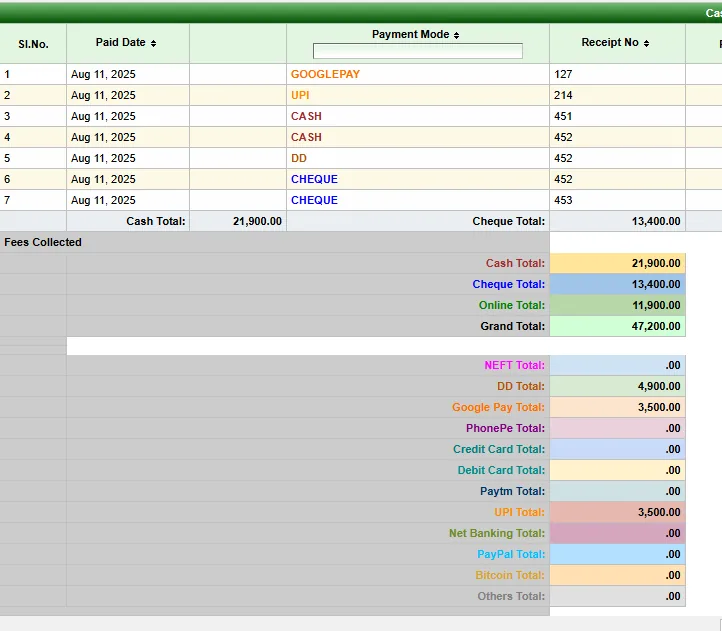
- Expanded tracking for Cash, Cheque, DD, NEFT, Online, Google Pay, PhonePe, Credit Card, Debit Card, Paytm, UPI, Net Banking, PayPal, Bitcoin and Others.
- Consistent colour coding across the Payment Mode columns in reports and the totals tables, for quick visual identification.
- Cash and Cheque are tracked separately. Every other mode has its own total and also rolls into the Online total.
2. Cash Master: single-entry daybook
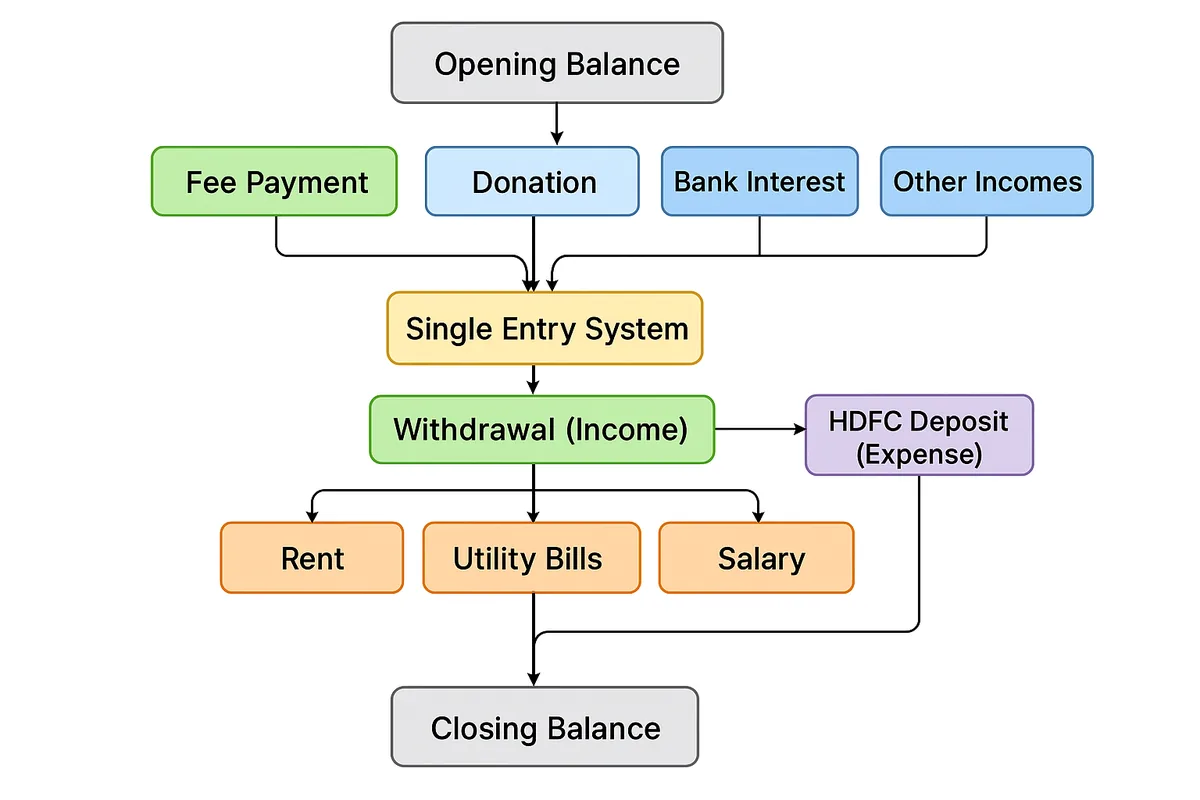
- Tracks opening and closing balances across years.
- Fee payments post automatically to Income. No account head is needed.
- Other income heads: donations, bank interest and other collections from non-students.
- Expense heads: rent, utilities, salaries and miscellaneous.
- Bank deposits and withdrawals (cashbox view): a deposit is treated as an expense (cash out of hand), and a withdrawal as income (cash into hand).
- Bank account identification: when adding bank accounts under Expenses, name them with “Deposit” as a prefix or suffix, for example HDFC Deposit or Deposit – SBI, so the system recognises them as bank-related.
3. How to use it
- Masters → Accounts/Groups: define income and expense heads. Fee is automatic; donation, bank interest and others are added manually.
- Accounts Payment: record income (new collections and withdrawals) and expenses (payments and deposits).
- Cash Master (daybook): review daily income, expenses, deposits and withdrawals, with opening and closing balances calculated for you.
4. Example
- Opening: ₹10,000
- Income: ₹5,000 fee (automatic), ₹2,000 donation, ₹1,000 bank withdrawal
- Expense: ₹3,000 rent, ₹4,000 HDFC Deposit
- Closing = 10,000 + (5,000 + 2,000 + 1,000) − (3,000 + 4,000) = ₹11,000
For a longer walkthrough, read Cash Master: simplifying school finances with smart daybook tracking.
5. Account Payments screen
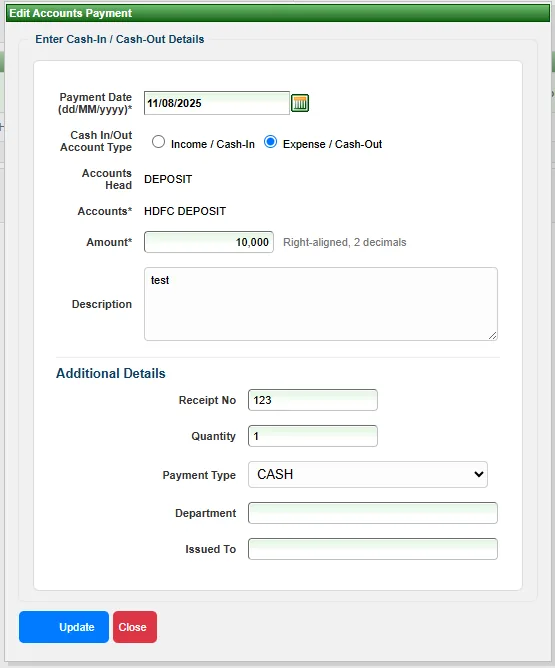
- Redesigned for clarity and ease of use.
- Income and Expense are also labelled Cash-In and Cash-Out to reduce confusion.
- Streamlined form layout with better field alignment, spacing and modern input styles.
- Improved date, amount and account selection controls for faster, more accurate data entry.
6. Templates and login
- ID cards support the
$motherNameplaceholder. - The login page shows MarvelSoft offers and updates.
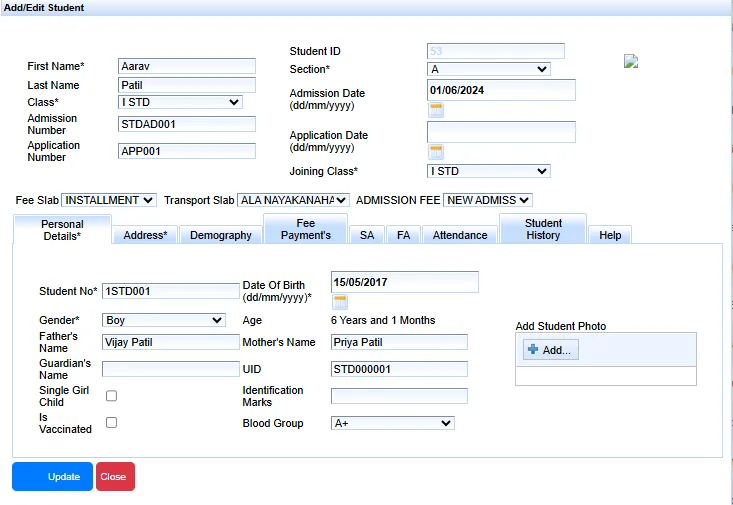
7. Student form
A compact layout with a fixed photo column, clearer labels, smart suggestions and light validation, which makes data entry faster and cleaner.
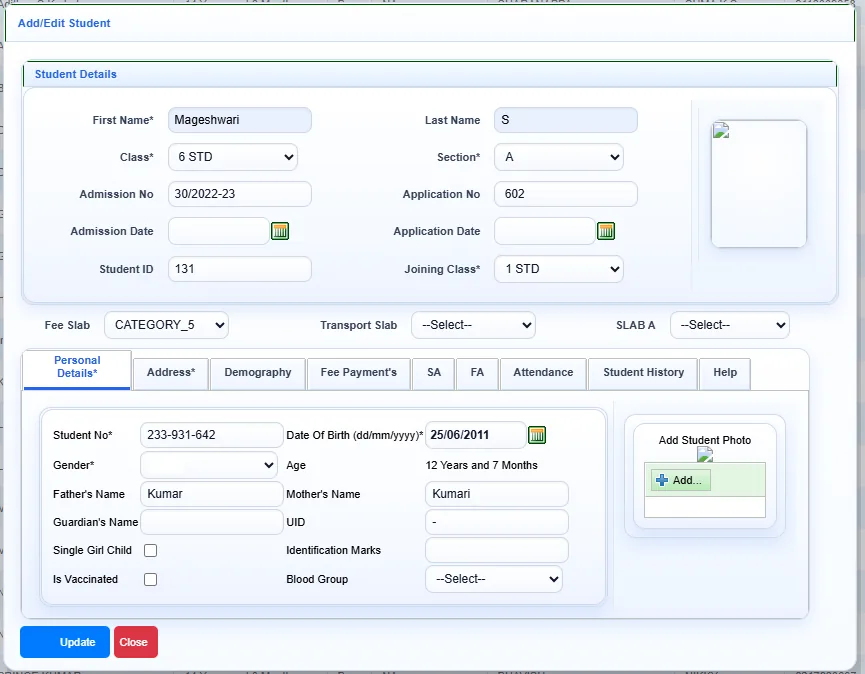
For comparison, the previous student form:
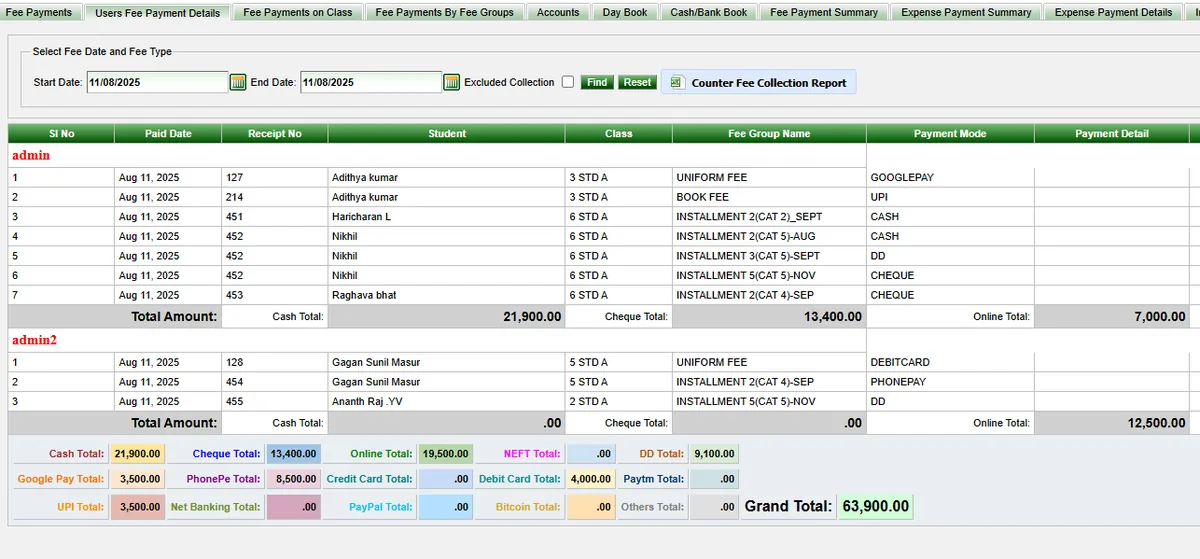
8. Fee collection by login
- New: login-wise fee collection details.
- Payment type breakdown (cash, online, cheque and so on) with group totals.
- Individual totals for each payment mode.
- A grand total across all cashiers and fee collection admins.
Other fixes
- The Book dialog is easier to read.
- An Admission Form display issue is fixed.
- A Help button is added in the Student and Fees modules.
MarvelSoft SchoolAdmin AI 1.0.1
New features
- Disk space in GB: get free and total drive space in gigabytes with
g# free spaceandg# disk space. - Configurable Tomcat service: set
TOMCAT_SERVICE_NAMEin.envto customise the Tomcat service lookup. - Customisable CORS origin: define the allowed client origin with
CLIENT_ORIGINin.env. - Flexible OpenAI setup: the API key and model (
OPENAI_API_KEY,OPENAI_LLM_MODEL) load fromapp.propertiesor.env.
SchoolAdminCE 2032.7
We are excited to announce the release of SchoolAdminCE 2032.7! This update includes significant database enhancements, simplified installation, optimized performance, and improved crash recovery, making school management smoother and more reliable.
Database Enhancements
- Optimized Database Structure: Improved indexing and optimized tables for faster data retrieval.
- Preloaded Data: Demo database now includes 2025 sample data for immediate testing.
- Pre-configured Academic Year: All new databases are now automatically set to 2025-2026.
- Faster Query Execution: Performance tuning has reduced query execution time by up to 40%.
Installer Simplification
- Direct Database Copy: Eliminated the need for manual MySQL import commands.
- Faster Setup: The installer now directly copies the database files, reducing installation time.
- Auto-Configuration: Database settings are automatically applied during installation.
Performance Optimization
- Memory Usage: Optimized MariaDB 10.3 to work efficiently with 1GB RAM and 200 concurrent connections.
- Buffer Pool Size: Configured InnoDB with a 64MB buffer pool for optimal performance.
- Connection Handling: Improved multi-user handling, ensuring smooth operation even under heavy load.
- Background Tasks Optimization: Reduced background query load for better system responsiveness.
System Performance & Capacity Benefits
- Increased User Capacity: Now supports up to 200 simultaneous users without performance drops.
- Faster Student Record Access: Handles 100,000+ student records efficiently with optimized queries.
- Improved Multi-School Management: Scales better for institutions managing multiple schools under one system.
- Seamless Data Handling: Reduced lag in fee processing, attendance tracking, and report generation.
- Optimized for Lower-End Servers: Works smoothly on servers with as low as 1GB RAM, making it cost-effective for small schools.
Power Failure & System Crash Recovery
- Automatic Crash Recovery: MariaDB now automatically restores the database after unexpected shutdowns.
- Reduced Data Loss Risk: Improved Write-Ahead Logging (WAL) ensures all transactions are saved before system crashes.
- Faster Recovery from Power Outages: Optimized InnoDB redo logs help restart operations without manual intervention.
- Safer Database Transactions: Changes are now committed securely, reducing the chances of corruption.
- Instant Restore on Restart: Even if power is lost during fee payment or attendance marking, data is safely recovered.
SchoolAdminCE 2032.6
We are excited to announce the release of SchoolAdminCE 2032.6! This update includes critical defect fixes, improved features, and valuable enhancements to streamline your school’s management process.
We are thrilled to unveil SchoolAdminCE 2032.6! This release is packed with key fixes, improved features, and impactful enhancements that will optimize your school’s management experience.
Defect Fixes
- School Logo Update: Issue where the school logo was not updating after license activation has been fixed.
- Elective Subject Assignment: Electives were not being assigned to students correctly. This issue has been resolved.
Employee ID Enhancement
- Introduced alphanumeric Employee IDs.
- Employees can now be searched using alphanumeric Employee IDs.
- Employee IDs are now printed in XLS reports and on Employee ID cards.
Video Conferencing Variables
- Variables were not being replaced with actual values in emails. This issue has been fixed.
Student Pre-Admission Module
- Added “Male / Female” options along with “Boy / Girl.”
- “City” field has been added to student pre-admission details.
- Fixed the issue where there was no space between the first name and last name in the pre-admission students’ menu.
Database Updates
- Updated Demo database with 2025 sample data.
- Pre-configured blank database for easy setup.
- Minimal setup database is now available.
- All databases are configured for the academic year 2025-2026 out of the box.
SchoolAdminCE 2032.5
Discover the most powerful updates yet, designed to make school management smoother and more efficient than ever before.
We are thrilled to unveil SchoolAdminCE 2032.5! This release is packed with key fixes, innovative new features, and impactful enhancements that will revolutionize your school’s management experience.
Defect Fixes
- Account Payments Voucher: Issue resolved! PDF print now generates smoothly without errors.
- Demo Mode: Added the ability for users to change the school logo while in demo mode. Please note, school details remain locked for your protection.
- PreAdmission Module: Now offering “Male / Female” gender options for a more streamlined process.
- Fee Payment Details: Corrected the formatting issue—student first and last names now display with proper spacing.
New Features
- Biometric Integration: Seamlessly track attendance! Now sync attendance data directly from ESSL/ZK Devices for both students and staff, making attendance tracking effortless.
- Video Conferencing Feature: Introducing built-in video conferencing powered by Jitsi Meet! Completely free and zero-configuration, you can schedule meetings, send invitations via email, and monitor all your online classes—all within SchoolAdminCE.
Enhancements
- Transport Fees Collection Report: New due reports available, with easy export options to Excel and PDF for streamlined data handling.
- Admission and ReAdmission Count Report: Gain better insights with newly added reports for both admissions and re-admissions.
- Staff Birthday Reminder: Celebrate your staff! A new dashboard feature that reminds you of staff birthdays so you can send warm wishes effortlessly.
- Default Values for Student Data Entry: Save time and reduce repetitive work! Set default values for City, State, District, Nationality, Mother Tongue, Admission Date, Application Date, Religion, and Zip Code. Now, data entry is faster and more convenient than ever.
- Java and Tomcat 64-bit Platform Upgrade: SchoolAdminCE is now updated to the latest 64-bit versions of Java and Tomcat, providing better memory management and ensuring all reports are generated without timeout errors.
- Examination Module Enhancement: Added more flexible maximum and minimum marks options, giving schools greater control over examination grading and customization.
SchoolAdminCE 2032.1
Experience the latest enhancements to streamline your school’s operations.
We’re thrilled to announce the release of SchoolAdminCE 2032.1! This update brings significant enhancements and improvements, addressing even the smallest details to make your experience smoother and more efficient.
Highlights
- Enhanced User Interface: A friendlier UI for school settings, students, fees, and master modules.
- Holiday Calendar Integration: Import your country’s holiday calendar directly into the system with Calendric API.
- Faster Login: Reduced login time for a seamless experience.
- Clearer Fee Receipts: Exact dues now shown on fee receipts.
- Improved Modules and Reports: Bigger, better views for student photos, ID cards, hall tickets, and reports.
- New Gender Options: “Male/Female” now available alongside “Boy/Girl” when adding students.
- Expanded Subjects: Increased elective subjects from 3 to 8 per student.
- QR Code Automation: Fee receipts now automatically include a QR code.
- Optimized Image Storage: Improved database storage to reduce duplicate data.
- Student Photo in Fee Payment: Quickly identify students with photos displayed in the payment module.
- Improved Suggestions: Enhanced city, state, and country suggestions while adding details.
- Updated Help Menu: Find the latest information faster.
- Java Updates Disabled: New installer disables the Java Update dialog box for stability.
- Service Update: Tomcat6 service renamed to SchoolAdminCE-Tomcat6.
SchoolAdminCE AI+ 2030.1
We are thrilled to announce the release of MarvelSoft SchoolAdminCE AI+ 2030.1, packed with exciting new features and enhancements to elevate your school management experience!
New Features and Enhancements
- iPhone App for Parents: Our mobile app is now available for iPhone, enabling parents to stay connected and informed, anywhere, anytime.
- Natural Language Database Queries: Effortlessly ask database-related questions using natural language, thanks to our powerful integration with ChatGPT.
- AI-Powered Assistance: Retrieve and manage information more easily with ChatGPT, providing intelligent, instant responses to school management queries.
- SMS Attendance Alerts: Stay on top of daily attendance with our new SMS notifications system.
- Customizable Fee Payment SMS Templates: Dynamically change SMS templates for fee payments and easily enable/disable SMS notifications via the KV config.
- Cash Master Day Book: Now displays comprehensive details for income, expenses, fee payments, and daily summaries, making financial management more intuitive.
Additional Improvements
- UPI QR Code Support: Display UPI QR codes directly in fee payment receipts and the fee payment module for seamless payments.
- Vertical Student ID Card Template: A new vertical ID card template is available in the scripts folder for quick customization.
- Reduced Application Size: We’ve reduced the installer and application size by over 100MB, leading to faster downloads and installations.
- Optimized Login Speed: Login time has been significantly improved to enhance your workflow.
- Favicon Added: A favicon icon is now included in the SchoolAdmin installer and app for better branding.
- Instant License Activation for Paid Users: Purchase your SchoolAdminCE AI+ 2030 license and enjoy instant activation without delays.
- Revamped Login Page: Experience a refreshed login page design that supports the latest AI features and functionalities.
The latest version, 2030.1, is available for both paid users and free download for testing at the download page.
SchoolAdminCE 2024.2
Explore the latest features and enhancements designed to streamline your school management experience.
We’re thrilled to announce the release of SchoolAdminCE 2024.2! This version introduces innovative features and improvements tailored to meet your school’s needs.
Highlights
- WhatsApp Integration: Send individual messages to students using WhatsApp Web.
- Flexible Fee Collection: Customize transport and monthly fee collections by selecting specific months.
- QR Code Payments: Collect payments effortlessly by utilizing QR codes.
- Compact Hall Tickets: Print hall tickets conveniently on half of A4 size paper.
- Enhanced Exam Reporting: Generate class or section-wise exam report cards effortlessly.
- Custom Report Card Formats: Enjoy flexibility with consolidated and term-wise report card templates, featuring two new designs.
- Comprehensive Day Book: Easily track income, expenses, and fee payments in the day book for better financial management.
- Birthday and Fee Payment Reminders: Send WhatsApp messages to students for birthdays and fee payment reminders.
- Attendance SMS Alerts: Receive daily SMS alerts for absentee students.
- AI Integration: Interact with your database through ChatGPT-powered prompts (# prompt) for generating custom queries and managing data effortlessly.
SchoolAdminCE 2024
Introducing innovative features and enhancements to make school management simpler and more efficient.
We’re excited to announce the release of SchoolAdminCE 2024, loaded with new features and improvements to enhance your experience!
Highlights
- WhatsApp Messaging: SchoolAdminCE 2024 supports WhatsApp messages for better communication.
- Updated Java and Tomcat Support: Fully compatible with Java 7 and the latest Tomcat 6.
- Image Backups: Student and staff images are automatically backed up for security and convenience.
- Thoughts for the Day: Download daily motivational thoughts directly from the internet.
- QR Code on Fee Receipts: Display QR codes on fee receipts for seamless UPI payments.
- Flexible Fee Collection: Collect regular fees from the admission date and disable monthly fee collection for selected months.
- Transport Facility Management: Enable or discontinue transport facilities anytime and disable transport fee collection for specific months.
- Streamlined Admissions: Admit students easily by collecting basic data from Aadhaar cards using the Android app.
- Offline Activation: Offline activation allows for testing without an internet connection.
- KVConfig Master: Manage configurations for fees, themes, and WhatsApp from the KVConfig Master.
SchoolAdminCE 12.1.10
Packed with exciting features and enhancements to make school management more efficient and user-friendly.
We are excited to announce the release of SchoolAdminCE 12.1.10. This update brings significant features and improvements to elevate your experience.
Highlights
- Updated Photo Manager: Take photos of students, staff, and parents via a webcam, which are directly updated in their details:
- Student Photo
- Father Photo
- Mother Photo
- Teacher Photo
- Book Photo
- Improved Report Cards: Placeholder text “Update School Photo” replaced with an emoji symbol in:
- Student Report Card
- Hall Ticket
- Student Reports
- Performance Visualization Graphs: Added features to visualize student performance:
- Visualize Student Report Card
- Visualize Consolidated Student Report Card
- Student Test Graph
- Student Term Graph
- Student Subject Graph
- Grading System Enhancements: Marks grade photo updates now display correctly in Visualize Student Report Card.
- Attendance: Daily attendance entered in the system now displays correctly in the student report card.
- CGPA on Report Card: CGPA marks are now displayed on the student report card.
- Fee Receipts: Fee receipts now include total dues by the parent.
- Library Master Import: Easily import library book details to the Library Master Book menu.
- Student Import: Added a student import option for easier data management.
- SMS Template Import: Easily import SMS templates to the SMS Template menu.
- SMS and Email Features: A new menu for SMS and email alerts includes:
- Send SMS Messages
- Send Email Messages
- Balance Check
- SMS and Email Logs
- SMS Variables: Send SMS messages with variables for better customization.
- Improved Fee Receipt Numbers: Separate or grouped receipt numbers:
- Generate receipt numbers by group (e.g., Admission Fee receipts starting from 1, Transport Fee receipts starting from 1).
- Manage receipt numbers starting from the academic year with year-specific settings.
- Theme Customization: Added a theme-changing option in the settings menu.
- Custom Fee Receipts: Generate fee receipts with different names, headers, and designs, such as one for the school and another for the society.